Scheduled Sending

 AY Mail 2. Professional and Corporate Editions
AY Mail offer two different types of scheduling. Both
methods require sending through AY Track.
If you want to send your message at a particular time
in the future you can select File->Schedule from
the main menu. AY Mail will compose messages and transfer them
to AY Track. AY Track will not send the message right away, but
will wait util the specified time.
The sending may take some time, especially if there are many
recipients, and therefore the message is not guaranteed to be
sent at the exact moment, but AY Track will not send it before
the specified moment, and it'll start trying to send as soon as
the moment comes.
The message is composed at the time of scheduling,
so any subscequent changes to the recipient list will not affect
the sending.
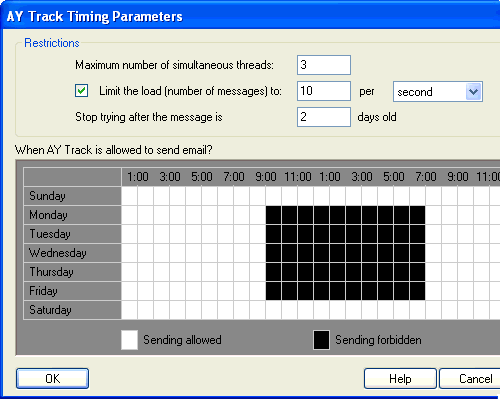
If you want to send your message when it is convenient,
such as during nights or low network traffic periods, you can
configure AY Track weekly schedule to allow sending only at
particular times:
You can freely combine both scheduling methods.
|